


Goodreads: Book Tracker & More
4.612.46K Reviews
App Specs
- Version
- 2.76.0 Build 0
- Updated On
- License
- Free
- Downloads
- 10,000,000+
- Developer
- Goodreads
- Categories
- Books & Reference
- Platform
- Android, iOS
Screenshots
 Analysis by AppCompare
If you're a book lover like me, then you're probably on the hunt for a killer app to manage your reading list. Let me introduce you to Goodreads: Book Reviews, a familiar name for anyone who likes keeping a record of what they read. I use it as a reading companion: a place to remember titles, see how my habits are changing, and get ideas when I’m ready to choose another book. It is a free Books & Reference app from Goodreads, rated Teen, and its 4.6 average from around 167,000 ratings suggests that many readers find it useful. The app has more than 10 million installs, but its value depends less on those numbers than on whether you enjoy tracking books and seeing what other readers think.
A simple routine that makes the shelves useful
My most reliable way to use Goodreads is to treat its shelves as a small, repeatable routine rather than a project I need to perfect. When a book catches my attention, I save it to the shelf for books I want to read. When I begin it, I move it to the currently reading shelf; when I finish, I mark it read and give it a rating if I have one. That quick sequence keeps the list meaningful without asking me to write a mini-review for every title.
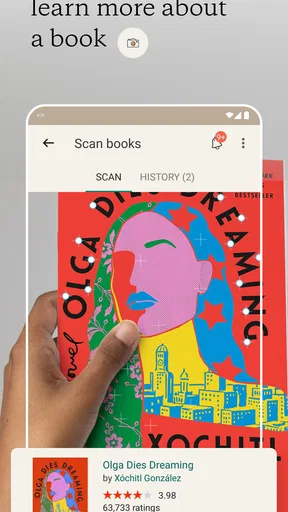
This is especially handy when I’m browsing a library catalogue, chatting with a friend, or standing in a shop and hear about a book I might like later. I can save the title instead of trusting myself to remember it. If I’m deciding what to read next, I can look at that saved shelf and compare possibilities against my mood, rather than starting from scratch. The practical benefit is not just having a list; it is having a list that reflects the difference between curiosity, commitment, and completion.
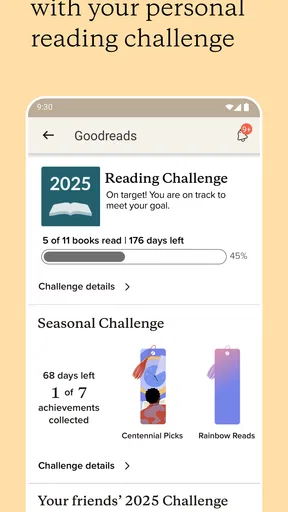
For readers who enjoy goals, progress tracking can add a gentle nudge. I’d use it as a way to notice my own pace, not as a scorecard that turns reading into homework. A target can be motivating during a busy stretch, but it can also make a slow, demanding book feel like a delay. I prefer to set a goal that leaves room for audiobooks, rereads, long novels, and weeks when life gets in the way. The app works best when the goal supports the pleasure of reading instead of competing with it.
Organize Your Reading Life
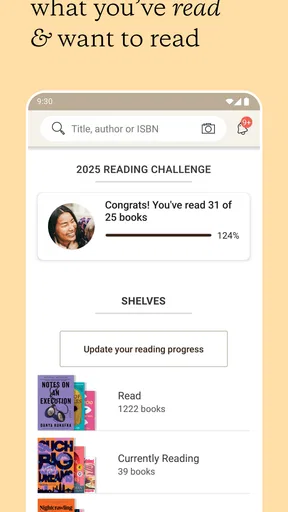
One of the coolest features of Goodreads: Book Reviews is how it helps you keep track of everything you're reading. You can create virtual bookshelves to organize books you've read, are currently reading, or want to read in the future. It’s like Marie Kondo for your reading habits! The app also lets you set reading goals and track your progress, which is perfect for those of us who need a little nudge to reach our yearly reading targets.
Small settings and habits that save effort
I’d start by checking the account and reading preferences that shape what appears in the app, then make the shelves match the way I actually choose books. A few clear categories are more useful than dozens of overly specific ones that become another chore to maintain. If I often borrow books, for example, I might keep a shelf for titles I want to borrow; if I mostly follow recommendations from friends, I might use a shelf to separate those suggestions from books I found on my own. Those are organizational habits, not special built-in shelf types, so the point is to name shelves around your own routine.
There is also a useful distinction between tracking a book and reviewing it. A rating is quick, while a written review takes more thought and becomes part of what other readers may encounter. I don’t feel obliged to write something for every book I finish. A short note about why I stopped reading, what mood a book suited, or who I would recommend it to can be more useful to my future self than a generic star rating. If I do write publicly, I try to avoid revealing plot turns and make clear when a book simply wasn’t right for me.
Worth Reading Before You Choose

Flipboard Shows What News Apps Must Do Beyond the Feed

Switching to Android Auto Means Rethinking Your Driving Routine

Google Calendar Makes a Crowded Week Easier to Manage

Ludo King Makes the Most of the Minutes Between Plans

Baby Panda World Brings Quick Play to Modern Phones, but Its Game Library Feels Busy

ESPN’s Live Game View Makes Following Close Games Easier
One low-effort habit is to add titles when they come up, then do a brief shelf tidy when choosing the next read. That keeps the saved list from turning into a pile of forgotten impulses. I also try not to rate a book immediately if I’m unsure; a little distance can help me decide whether I liked the writing, the story, or simply the moment in which I read it. Goodreads is a record, but the quality of that record depends on how honestly and consistently I use it.
Dive Into a Sea of Reviews
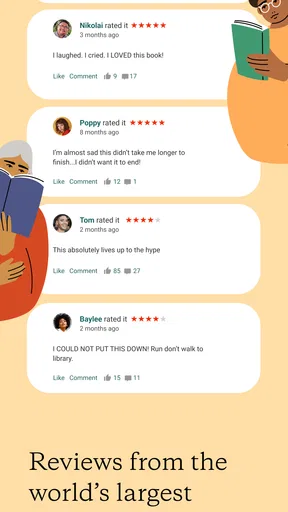
Ever stood in a bookstore, book in hand, and wondered if it’s worth the read? With Goodreads, you can check out reviews from fellow readers before you commit. The community is super active, providing honest feedback and ratings on a vast number of titles. It’s like having thousands of friends to recommend books to you, and boy, is that helpful!
Using reviews without letting them choose for you
Reader reviews are most useful to me when I treat them as clues rather than a verdict. A low rating might come from a reader who wanted a different genre or a faster pace; a glowing review may reflect a taste I don’t share. I look for comments that mention concrete things—such as a book’s tone, structure, or level of detail—and compare those with what I already know I enjoy. This makes the community valuable even when I disagree with its overall mood.
That approach matters when a title is widely discussed. A quick glance at ratings can help me avoid a book that clearly does not suit my preferences, but it can also make me overlook something unusual that might be exactly what I want. I try to read a small range of opinions instead of scrolling until I find one that confirms my first impression. For books I already plan to read, I avoid reviews that discuss plot specifics so the app does not spoil the experience before I open the book.
Compared with a retailer’s review section, Goodreads is more centered on a reader identity and an ongoing record of reading. Compared with a private notes app or a simple list, it adds public ratings, reader reactions, and the possibility of connecting with people whose tastes I recognize. The trade-off is that community opinions can influence a decision before I have given a book a fair chance. If I want an entirely private log with no social layer, a notes app or spreadsheet may suit me better; if I want context from other readers, Goodreads has the clearer advantage.
Connect with a Community
Speaking of friends, Goodreads isn’t just for solo bookworms. You can connect with friends to see what they’re reading, share book recommendations, and even join book clubs. It’s a fantastic way to discover new books and authors based on what people in your network are enjoying. Plus, you can participate in discussions and book challenges, making the reading experience more interactive and fun.
A realistic reading day with Goodreads
Imagine I’m on the bus home and a friend mentions a novel I haven’t heard of. I add it to my to-read shelf while the name is still fresh. Later, I check the title’s reader responses and notice that people describe it as slower and more character-focused than I expected. That does not automatically put me off; it simply helps me decide whether it fits the kind of evening reading I want. When I start it, I move it to my current shelf, and after finishing I can record my reaction before the details blur together.
That kind of small loop is where the app earns its place for me. It avoids the familiar cycle of hearing a recommendation, forgetting the title, and then asking someone to repeat it weeks later. It also gives me a way to follow what friends are enjoying without turning every conversation into a formal book club. Readers who already keep a meticulous journal may find the extra logging unnecessary, but anyone whose reading life is spread across recommendations, library holds, and half-remembered titles can benefit from having one dependable place to return to.
The social side is a choice, not a requirement for making a useful personal list. I would connect with friends whose reading preferences genuinely interest me rather than trying to build the largest possible network. A smaller feed can make recommendations easier to notice and discussions more enjoyable. If social updates distract you, focus on your own shelves and progress instead; the app still has value as a tracker and discovery tool without making reading a public performance.
Discover New Reads
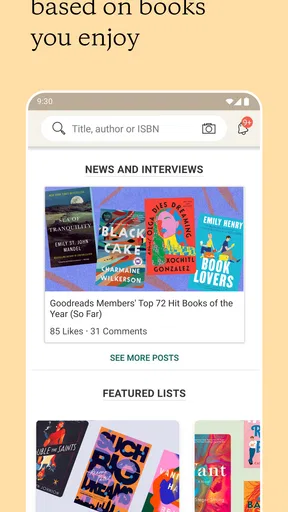
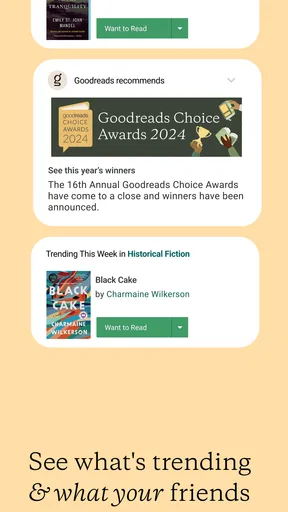
Thanks to its personalized recommendations, Goodreads helps you find books that match your taste. Based on your reading history and ratings, the app suggests new titles you might like. It’s like having a personal book shopper who knows your preferences inside and out. And if you love discovering hidden gems, Goodreads' extensive database ensures you'll never run out of options.
Where discovery helps—and where it can miss
Recommendations become more useful when I rate books thoughtfully and keep my reading history reasonably current. If I have only logged a few titles, or if I rate everything highly without distinguishing what I truly loved, the suggestions may feel broad. I see them as prompts for exploration rather than a promise that every title will be a match. A recommendation that looks unexpected can still be worth investigating, especially when its description or reader commentary points to an aspect I enjoy.
There is a trade-off between discovery through an algorithm and discovery through people. Recommendations based on past ratings can reinforce familiar tastes, which is comfortable but may keep me circling the same genres. Friends can introduce books outside my usual pattern, though their preferences may differ from mine. I get the best results by using both: let recommendations surface possibilities, then use a trusted reader’s opinion or a few specific reviews to decide whether to add a book to my list.
For readers who mainly need an e-book reader, a library-borrowing service, or a place to buy books, Goodreads is not a replacement for those tools. Its strength is keeping track of reading and adding a social discovery layer, not serving as the reading device itself. I would skip it if I dislike maintaining lists, avoid reader ratings entirely, or want a completely private record with no community context. It is a better fit for someone who enjoys collecting ideas, revisiting past reads, and sharing occasional recommendations.
Limits worth knowing before you settle into it
The app’s usefulness depends on reader participation, so a large collection of opinions does not mean every title has equally helpful feedback. Reviews vary in detail and perspective, and popular books can attract strong reactions that do not represent every reader. I would not use a single rating as the deciding factor for a book purchase or library request. For a niche title, a trusted librarian, bookseller, or friend may offer more relevant guidance than a broad crowd response.
Another limitation is the upkeep. If I finish books but never mark them read, or save every passing suggestion without revisiting the list, my shelves stop reflecting what I actually want. That is not a flaw unique to Goodreads, but the app makes the habit visible: an uncurated list can become intimidating. A brief monthly cleanup—removing titles I no longer want and adding a sentence to a few meaningful entries—keeps the record useful without demanding a full reading journal.
Goodreads is free, and the current version is 2.70.1 Build 6, with support for operating systems starting at version 10. It is rated for teens, so it is intended for that age group and older. Those practical details make it easy to consider as a low-commitment tracker, but I would still think about how much of my reading activity I want to share. If privacy and a strictly personal archive matter most, I would choose a private notes tool; if I want friends’ updates and reader perspectives alongside my own record, the social format is part of the appeal.
Mastering the routine without making reading a chore
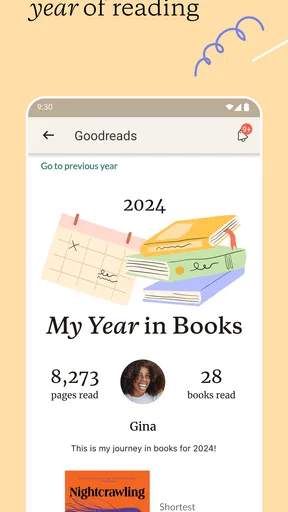
After using it as a regular reading companion, I think Goodreads is at its best when I keep the workflow light: save a promising title, move it when I begin, and record a considered reaction when I finish. I check reviews for practical clues, not permission to read, and use recommendations as a way to widen my options rather than dictate them. The app’s mix of shelves, progress, ratings, and community is more useful than any one piece on its own because each can support a different moment in the reading process.
It is not the right choice for every reader. Someone who only wants a clean shopping or reading interface will be better served by an app built for buying, borrowing, or opening books. Someone who dislikes ratings and social feeds may prefer a private list. But if you like seeing your reading history take shape and enjoy hearing what other readers think, Goodreads offers a practical home for that habit. I’d recommend it to the friend who keeps asking me to remember book titles for later, with one caution: let the list help you read more happily, not pressure you to read more quickly.
Make the Community Work for You
Goodreads: Book Reviews is one of those apps that I wish I had discovered sooner. It’s more than just a tool; it’s a community and a resource that makes reading even more enjoyable. Whether you’re a casual reader or a bookworm who devours novels like candy, this app is a game-changer. So, why not give it a shot? Your next favorite book could be just a tap away!
Pros
- Extensive book database for discovery.
- Personalized recommendations based on reading.
- Connect with a community of book lovers.
- Track reading progress and set goals.
- User-friendly interface with intuitive navigation.
Cons
- Ads can be intrusive for free users.
- Limited audiobook integration options.
- Some features require a stable internet.
- Occasional glitches with reading lists.
- Notifications can be overwhelming.
FAQs for Goodreads: Book Tracker & More
What is Goodreads and how does it work?
Goodreads is a platform where users can discover new books, read reviews, and connect with other readers. It allows you to track your reading progress, rate and review books, and join discussions in online book clubs. With personalized recommendations and the ability to create reading lists, it makes finding and sharing books easy.
Is Goodreads free to use, and are there any in-app purchases?
Yes, Goodreads is free to use. You can create an account and access most features without any cost. However, while the app itself does not have in-app purchases, it does provide links to purchase books from various retailers if you wish to buy them.
How does Goodreads handle user privacy and data security?
Goodreads takes user privacy seriously and has measures in place to protect your data. Users have control over their profiles and can adjust privacy settings to manage visibility. The app's privacy policy outlines how data is collected, used, and shared, ensuring transparency for users.
Can I use Goodreads offline, and what features are available without an internet connection?
Goodreads requires an internet connection for most features, including browsing books, updating reading progress, and participating in discussions. However, you can still access your saved lists and previously downloaded content when offline, allowing for some degree of usability without internet access.
How can Goodreads enhance my reading experience?
Goodreads enhances your reading experience by offering personalized book recommendations based on your reading history and preferences. It connects you with a community of readers for discussions and reviews, helping you discover new books and authors. The ability to track your reading goals and progress adds motivation and structure to your reading habits.


